Morse Code Translator

Translate any text to Morse Code or decode Morse Code back to text instantly, with real-time highlighting, adjustable speed, phone vibration and one-click audio export.

Choose a Morse
1 words / 3 characters
Morse Code

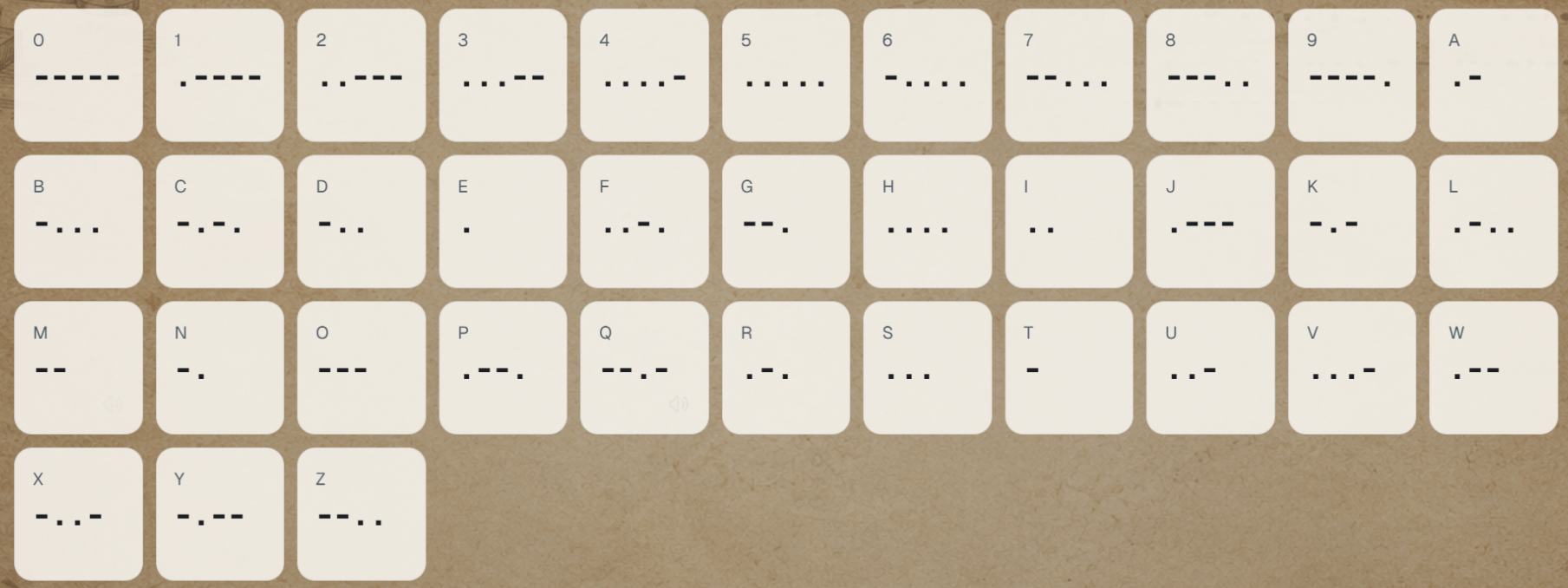
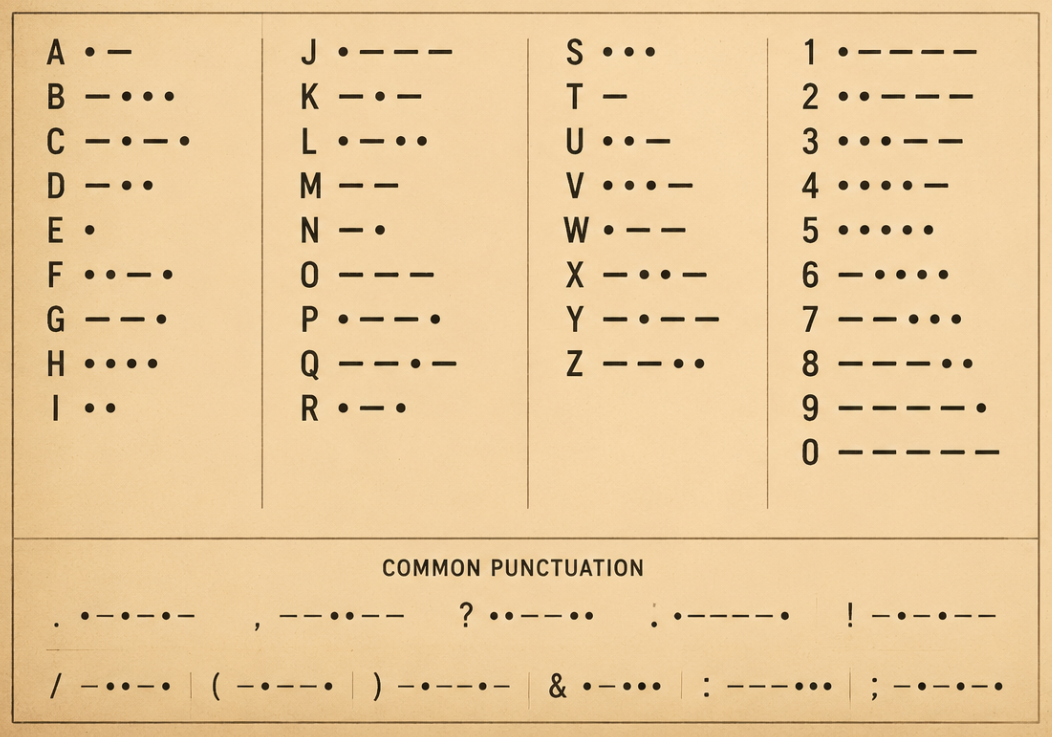
Morse alphabet and numbers

Tap any symbol to preview its sound. The grid uses International Morse code for letters and digits.

What is Morse code?

Ever wondered how a simple beep can spell out a message? Morse code uses short and long signals — known as dits and dahs — to represent letters, numbers, and punctuation. In writing, we show them as dots and dashes, which is why many learners look for a Morse code alphabet chart or a morse code translator.

International Morse code is still alive and well. It's great for radio practice, emergency signaling, education, puzzles, and for understanding how information can be encoded with just a few simple timing rules. Each letter has its own little beat: A is .-, S is ..., and O is ---. Numbers have longer patterns — for example, 1 is .---- and 0 is -----.

morse code alphabet

This online Morse code translator helps you convert plain text into Morse code, listen to the audio, adjust speed and pitch, and study the alphabet reference — all in one place. Since Morse is built on sound and timing, hearing the dits, dahs, and spaces is often much easier than memorizing dots and dashes by sight. So give it a try — type something in and let your ears learn the code!

Why choose our Morse code translator?

This Morse code translator is built to be more than a basic converter. It combines translation, playback, customization, and study tools in one workflow so users can understand both the code and the signal behind it.

1. Two-way translation

You can convert plain English text to Morse code and also translate Morse code back into text. This makes the tool useful for both quick lookup and real learning practice.

Two-way translation

2. Real-time Morse code audio

The generated code can be played instantly in the browser, so users can hear the actual dits, dahs, and spacing instead of only reading dots and dashes on screen.

Real-time Morse code audio

3. Adjustable practice controls

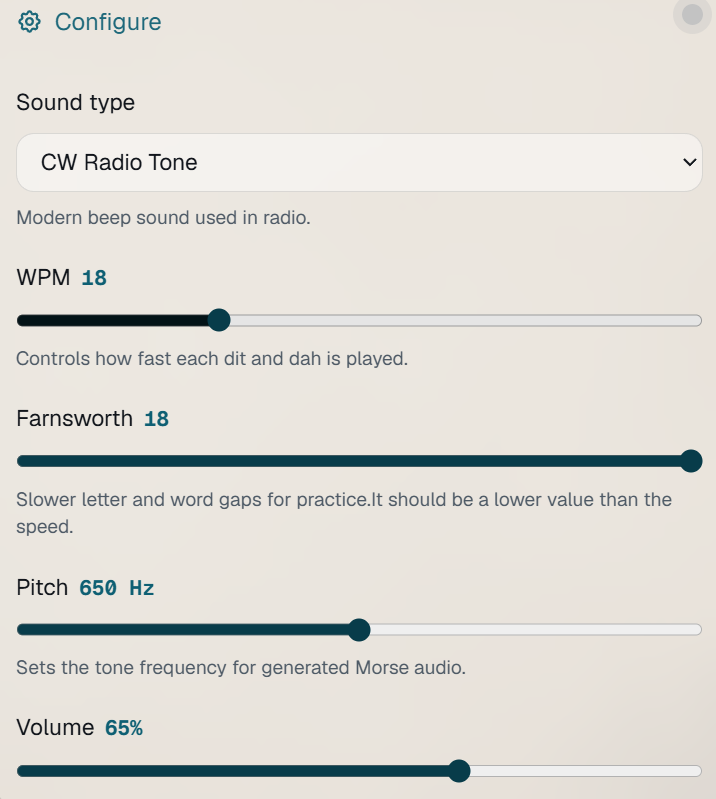
WPM speed, pitch, volume, and sound type can all be tuned before playback. That flexibility helps beginners slow things down and lets experienced users practice at a more natural speed.

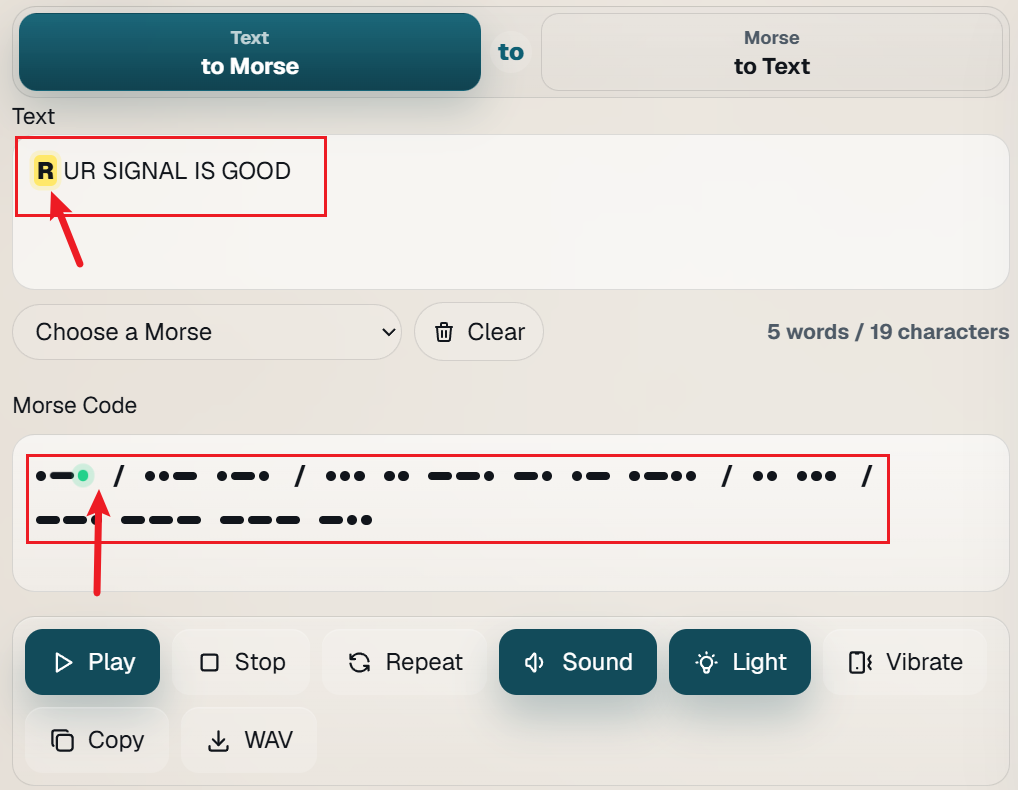
4. Interactive playback feedback

During playback, the Morse symbols highlight in real time, making it easier to connect the visual code with the rhythm you hear and improve recognition faster.

Real-time Morse code audio

5. Built-in learning reference

The Morse alphabet and numbers grid is available on the same page, so users can study individual characters, compare patterns, and preview sounds without leaving the tool.

Built-in learning reference

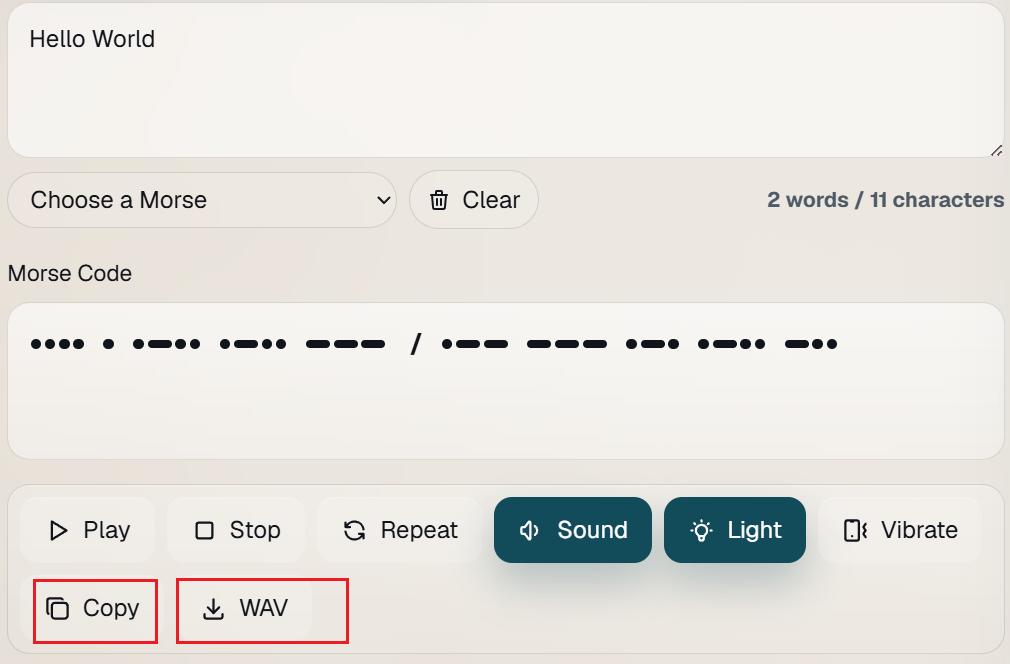
6. Copy and WAV export

Once the result looks right, it can be copied for messages and notes or exported as a WAV file for offline playback, classroom use, and training material.

Copy and WAV export

How to use the Morse code translator

Step 01

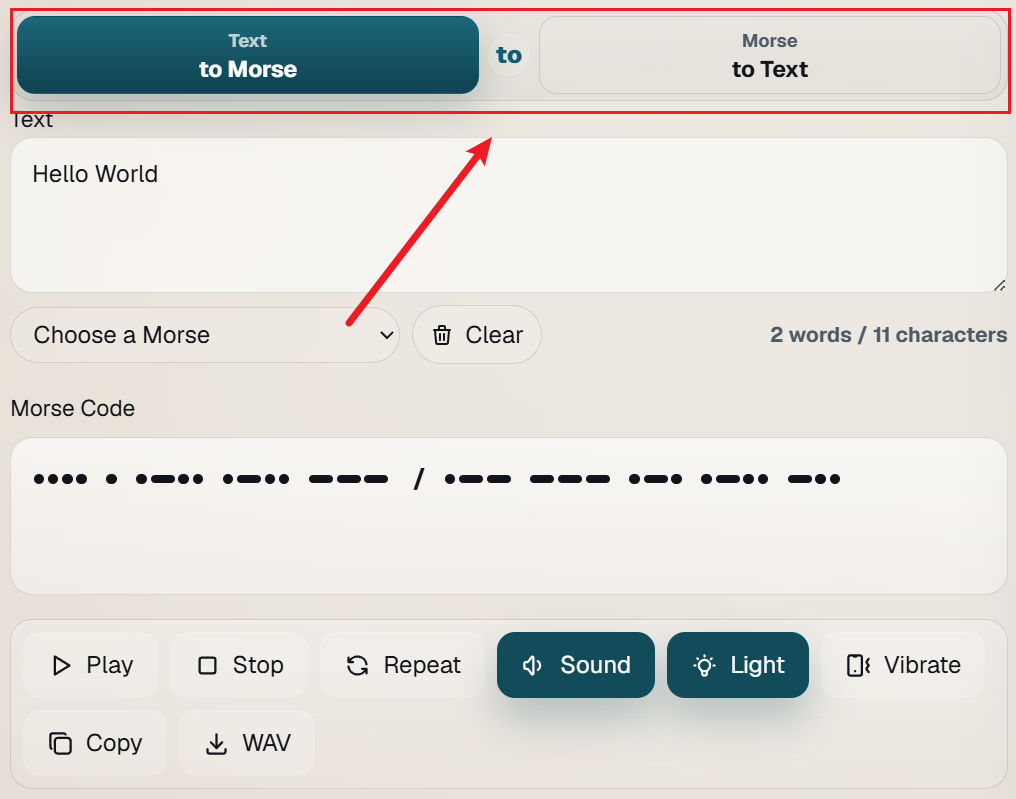
Choose a translation direction

Switch between text to Morse code and Morse code to text, then type in the main input area. You can also use the built-in examples like SOS for a quick start.

Step 02

Adjust playback settings

Fine-tune WPM speed, pitch, volume, and sound type before playback. If you want extra feedback, you can also turn Sound, Light, or Vibrate on and off from the control row.

Step 03

Play and follow the signal

Use Play, Stop, and Repeat to listen to the rhythm of each character. During playback, the Morse symbols are highlighted in real time so you can match the timing to the generated code.

Step 04

Copy or export the result

Copy the translated output for messages, radio practice, or study notes, or export it as a WAV file when you need downloadable Morse code audio for lessons or training.

How Morse code works

Morse code works by turning written language into timed signals. Each letter, number, and punctuation mark is assigned a unique pattern made from short signals and long signals. On screen these are shown as dots and dashes, but in practice they can be heard as audio tones, seen as flashing light, or felt as vibration.

The meaning does not come from the shape of the symbols alone. It comes from the order of the signals and the spaces between them. For example, `E` is a single dot, `T` is a single dash, `A` is `.-`, and `N` is `-.`. Because every character has a different rhythm, skilled listeners often recognize whole patterns by sound instead of mentally counting each mark.

Morse timing is built on one unit. A dit lasts one unit, a dah lasts three units, the gap inside a character lasts one unit, the gap between letters lasts three units, and the gap between words lasts seven units.

This 1:3 rhythm is why clean Morse audio feels musical. Adjusting WPM changes the length of every timing unit while preserving the relationship between dits, dahs, and spaces.

That is why a Morse code translator with live playback is useful for learning. You can see the code, hear the timing, and connect the visual pattern with the actual signal that would be sent over radio, light, or other simple communication methods.

How to learn Morse code

The fastest way to learn Morse code is to treat it like listening practice, not memorization homework. Start with a small set of common letters such as E, T, A, N, S, and O, then play them at a comfortable speed until their rhythms feel familiar. It is better to recognize the sound pattern immediately than to translate dots and dashes one by one in your head.

Use the controls in this Morse Code Translator to lower or raise WPM, repeat short examples, and compare text with generated Morse code. Practicing with short words like SOS, CODE, and HELLO helps you build confidence before moving to full sentences. Consistent daily practice for a few minutes usually works better than long, tiring sessions.

Once the alphabet feels natural, move on to numbers, punctuation, and real playback drills. Copy the output from the Morse Code Translator, replay it, and test yourself in both directions — from text to Morse code and Morse code to text. This two-way practice, combined with the instant feedback this translator provides, will help you improve much faster than studying with static charts alone.
Frequently asked questions

Short answers for learners, teachers, radio hobbyists, and anyone using Morse code in a browser.

How do I use this Morse Code Translator to learn faster?

The fastest way to learn is to treat it like listening practice, not memorization homework. With this Morse Code Translator, you can: Start with a few common letters like E, T, A, N, S, and O.Adjust the WPM speed to a comfortable tempo.Play short words like SOS, CODE, and HELLO repeatedly until their rhythms feel familiar.The key is to recognize the whole sound pattern at once, rather than translating dots and dashes one by one in your head. This translator gives you instant audio feedback so you can train your ear from day one.

What do the timing numbers (1, 3, 7) mean in Morse code?

Morse code timing is built on a simple ratio. Think of one unit as a beat: A dit (dot) lasts 1 unit. A dah (dash) lasts 3 units. The gap inside a character lasts 1 unit. The gap between letters lasts 3 units. The gap between words lasts 7 units. This 1:3:7 ratio is what gives Morse its distinctive, almost musical rhythm. When you adjust the WPM (words per minute) speed, every unit changes length together — so the ratio stays the same, and the code keeps its rhythm at any speed.

I'm completely new to Morse code. Where should I start with this translator?

Welcome! Here's a simple 3-step plan to get started with this Morse Code Translator: 1.Play around — Type your name or a short word and click play. Just listen and get a feel for the sounds. 2.Start small — Focus on the 6 easiest letters: E (.), T (-), A (.-), N (-.), S (...), and O (---). Use the translator to hear them repeatedly. 3.Practice daily — Spend 3–5 minutes a day with short words. Before you know it, you'll start recognizing patterns without thinking. And remember: don't worry about speed at first. Get the rhythm right, and speed will follow naturally. This Morse Code Translator is here to guide you every step of the way.

Why does the same text sometimes sound different at different speeds on this Morse Code Translator?

It's the same code — just played faster or slower. When you increase WPM, every timing unit (dits, dahs, and all the spaces) becomes shorter. When you decrease WPM, everything becomes longer. The ratio between them stays perfectly intact, so the code always sounds correct and recognizable, just at a different pace. Think of it like playing a song at a different tempo — the melody stays the same, but the feel changes. This Morse Code Translator lets you experiment with different speeds so you can gradually work your way up to real-world listening speeds.

What's the difference between reading Morse and listening to it on this translator?

Reading Morse (dots and dashes on a screen) is a good starting point, but listening is what makes it stick. That's because Morse is fundamentally an audio-based system. Skilled operators don't count dots and dashes — they recognize the whole rhythm of a character, much like you'd recognize a song by its melody rather than reading sheet music.This Morse Code Translator is designed specifically to bridge that gap. You can see the code, hear the timing, and connect the visual pattern with the actual signal — all at the same time. That combined visual-audio approach is what sets this translator apart from static charts.

Can I use this Morse Code Translator for radio or emergency signaling?

Absolutely. The code you see and hear in this Morse Code Translator is International Morse Code, which is the standard used worldwide for radio communication, aviation, and emergency signaling. For example, SOS (... --- ...) is the universal distress signal. While this translator is designed for learning and practice, the patterns it generates are the same ones that would be sent over radio, light, or other communication methods in real situations.

What do the WPM and pitch controls do in this Morse Code Translator?

WPM (Words Per Minute) controls the playback speed. Lower WPM makes the code slower and easier to follow — great for beginners. Higher WPM sounds more like real-world Morse, which is useful once you are comfortable. This Morse Code Translator lets you adjust WPM freely so you can learn at your own pace. Pitch controls the audio tone frequency (how high or low the beep sounds). Choose a pitch that is clear and pleasant to your ear — this can make a big difference in how easily you recognize patterns. Feel free to experiment! There is no "right" setting — just what works best for you. The flexibility of this Morse Code Translator means you can customize your learning experience completely.